
A remnant with a name: keeping mill certificates attached to steel you have already cut
Contents — 7 sections
Most shops handle remnants the same way. A usable piece comes off the saw, somebody stands it in the rack, and the mill certificate for the bar it came from stays filed against a delivery note that no longer describes anything physical.
Six weeks later somebody wants to use that piece and asks what it is and whether it can be certified. The honest answer is that nobody knows, so it goes into work that needs no certificate, or it stays on the rack. The steel is perfectly good. What failed is the link between the steel and its documents, and it failed at the moment of cutting.
Everything below runs in the Warehouse module, which is available from the Pro plan up. On Free and Small Workshop you can still optimise and produce drawings; the stock, goods-received and remnant records described here are not there. The comparison matrix is the authority on what each tier carries.
Three identifiers, doing different jobs
KRON Cutting tracks stock with three numbers. They are easy to conflate, and being precise about which does what is most of the work.
The item code identifies a kind of bar. Every item with identical geometry and material shares an item code and occupies a single row in the warehouse, the same item code across different batches. It answers "what is this".
The batch number identifies a delivery. On each goods received note (GRN), items are assigned a batch number matching the GRN number, so it answers "which consignment did this come from". Clicking an item's row in the warehouse expands the batches inside it.
The tag identifies one physical piece. It is stamped at the moment of production in 10-10-10
format and stays with that piece for the rest of its life.
The first two exist in most stock systems. The third is what makes remnants tractable.
What happens at receipt
The link is established before any cutting, on the way in.
Registering a Warehouse Receipt means entering the supplier, then the quantity, length, profile and cut angles for each line. The step that matters is attaching the accompanying documents, mill certificates among them, to each profile line.
Those documents are not filed against the GRN as a whole. They attach to the profile line, and they are inherited by every child item that later appears in the warehouse as a remnant. Everything below follows from that.
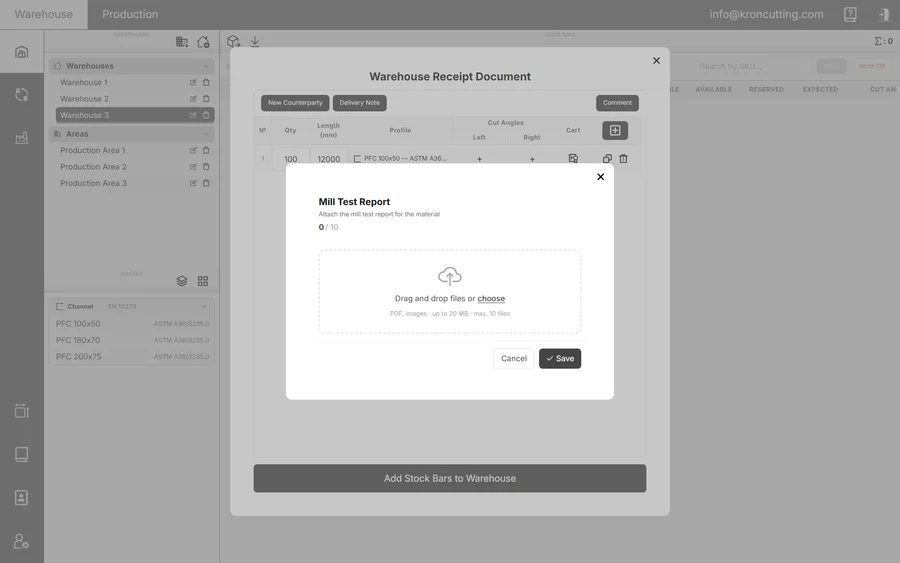
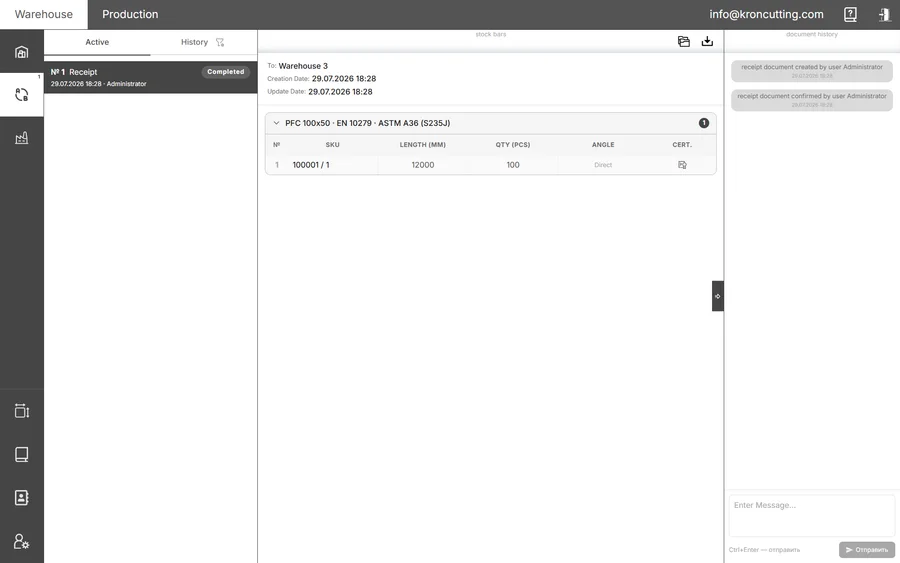
A Receipt document — the GRN — is created with a sequence number that doubles as the batch number, and the profiles appear in the Expected column. Accepting moves them into the quantity on hand and sends the document to History; cancelling removes them from Expected.
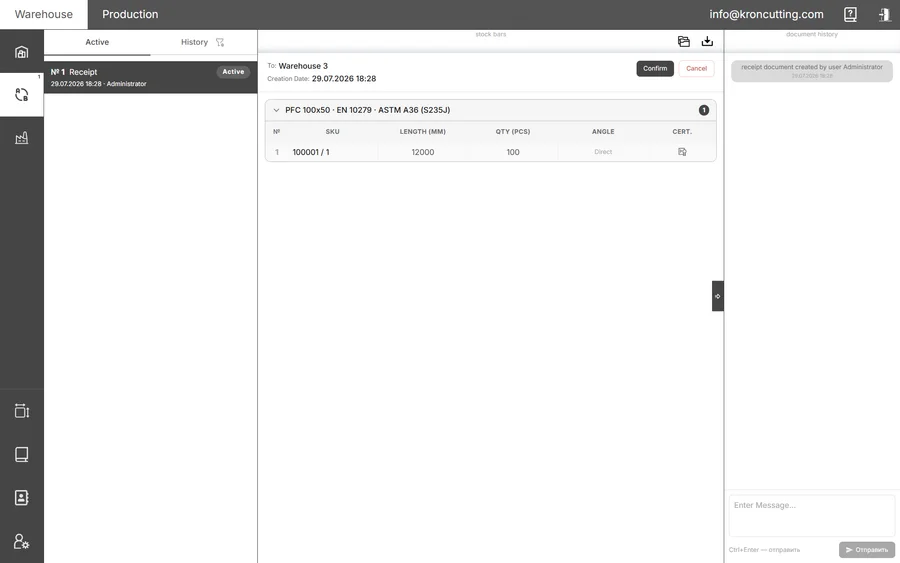
Acceptance is what makes the stock real. Until then the profiles sit in Expected, and the documents you attached travel with them.
What happens when the bar is cut
Remnants are produced on the production area, and the Offcut Manager inside the work order is where they are dealt with. A Remnant Receipt document is created there, but accepting or cancelling it falls to the warehouse rather than to production.
The split is deliberate. Production knows a piece exists; the warehouse decides whether it is taking it, so a remnant nobody accepts does not quietly become stock.
On acceptance the items become warehouse stock available for cutting, and each one stores information about its parent stock bar and inherits its mill certificates and other documents. The piece in the rack now carries the actual certificate for the bar it was cut from, attached and readable without anyone reconstructing the trail. On cancellation everything returns to the Offcut Manager in the work order, so nothing is lost by refusing.
How the identifiers combine
A remnant carries its unique tag from the moment of production. When it enters a Remnant Receipt document it is also assigned an item code like any other stock bar, and the two are written together with a slash:
182839 / 10-10-10
The item code says what it is, so it can be found and nested alongside every other bar of the same profile and material. The tag says which piece it is, so its history stays specific to it. The tag also serves as the batch number, which follows naturally enough once you see it: a remnant is a consignment of exactly one.
A remnant is therefore interchangeable and unique at the same time. Interchangeable to the optimiser, which only needs to know it is 2140 mm of a particular section. Unique to the paperwork, which needs to know which bar it came off and what that bar's certificate said.
What does not get a number
Not everything is worth tracking, and KRON is explicit about it. A Disposal document handles the irreversible removal of production waste, accounting for everything down to the smallest pieces. Like a Remnant Receipt it is created in a work order and accepted or cancelled by the warehouse.
No item code is assigned to disposed elements. They are leaving, and an identifier for something nobody will ever look for again is work with no reader.
Why this changes what a remnant is worth
A remnant with no provenance is worth scrap value plus optimism. You can use it wherever nothing needs certifying and you will hesitate over every other case, which is how shops end up with a rack that is simultaneously full and useless.
A remnant carrying its parent's certificate is worth what the steel is worth. It can go into the same work as a new bar, because the same question has the same answer. Once that holds, the Max. Offcut Length threshold in your cutting settings starts describing something real: the optimiser preserves long pieces and the long pieces are actually usable.
The two features are the same feature seen from opposite ends. Optimising for remnant achieves nothing if remnants cannot be certified, and certifying remnants achieves nothing if nothing sets out to produce usable ones.
The practice, in order
- Attach documents at receipt, against each profile line. Filing them against the delivery as a whole loses the connection that the rest of this depends on. It is also the easiest step to skip, because nothing goes wrong today when you do.
- Let the warehouse accept remnant receipts. The production area proposes and the warehouse accepts. Collapsing the two into one role because it is faster removes the check the split exists to provide.
- Read the slash. In
item code / tagthe left half is for the optimiser and the right half is for the auditor. - Dispose properly. Waste written off cleanly stops occupying the rack and the conversation.
None of this is exotic. It is ordinary stock discipline applied to a class of material most shops have decided is not worth the discipline, which is exactly why the rack is full.