
Everything you need to cut linear metal — in one place
From import, to an optimised nest, to saw-ready output and warehouse control.
Manual cut planning quietly costs you money
Off-cuts pile up — every metre you cannot find again goes to the scrap bin.
Re-keying geometry from Tekla by hand is slow and quietly introduces errors.
Nobody knows what is actually left on the rack, so you over-order.
Drawings for the saw operator take hours to prepare by hand.
Nest tighter, splice smarter
The engine that turns a bar list into a cutting plan, with the real geometry of the cut accounted for.
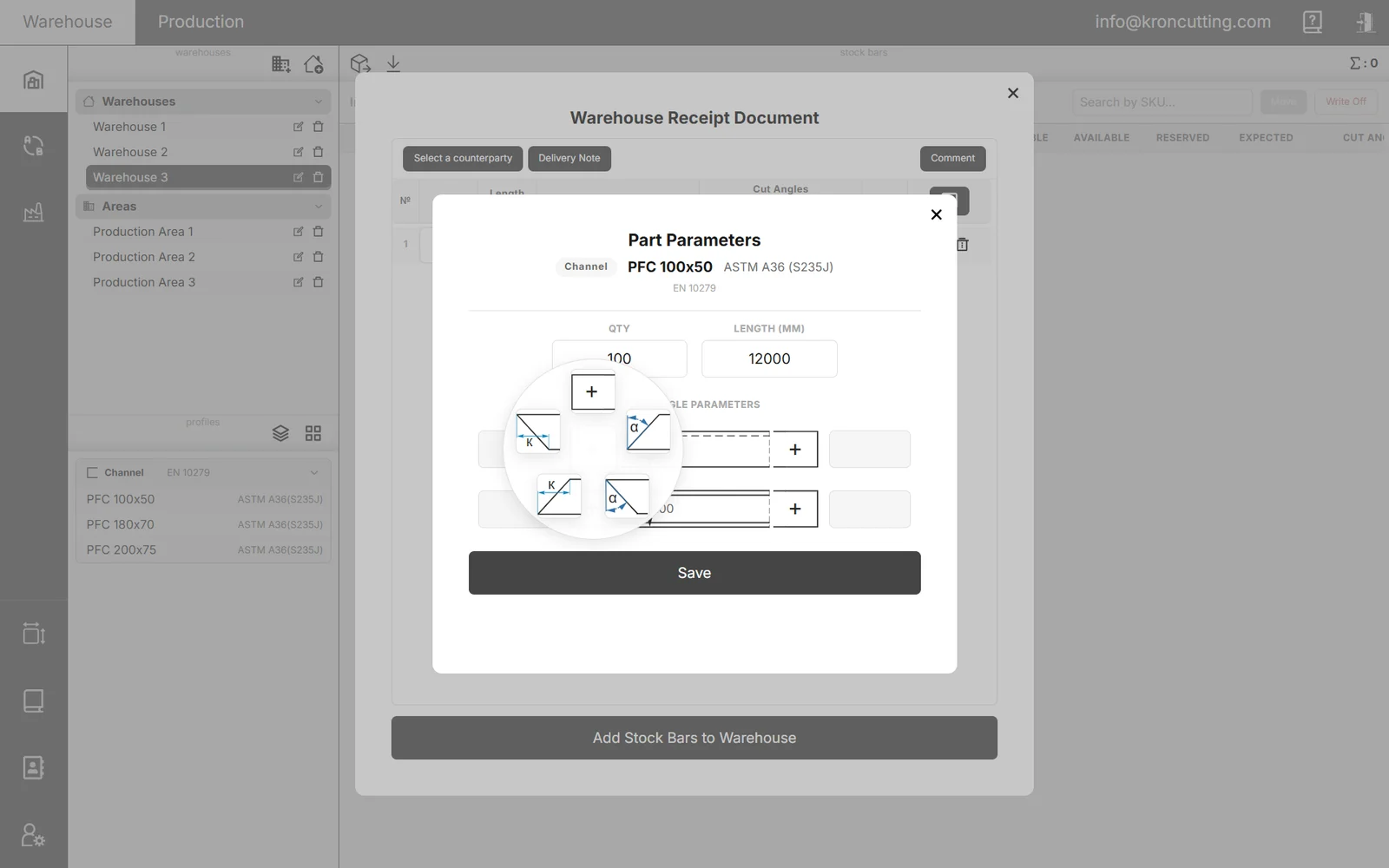
- Cut-angle-aware nestingStraight, mitre and complex end cuts. Where two adjacent cuts have different angles, KRON Cutting can add a gap so both can physically be made — or ignore angles entirely and use each part's overall dimension.
- Splice controlAllow or forbid splicing per profile, cap the number of splices, set the minimum distance from the part end and the technological gap, and block splices near holes, abutments, cut-outs, ends or centres.
- Kerf and remnant rulesKerf width is added during nesting so the stock bar length is sufficient. Anything longer than your maximum offcut length becomes a tracked remnant rather than scrap.
- Variants and iteration stepChoose the variant that minimises waste or the one that minimises splices, or let Auto run both and return the better result. Coarse, Normal and Fine iteration trade run time against tightness.
Bring parts in without re-keying
- DSTV (NC1) from TeklaGeometry, profiles, materials and cut angles are read from the NC files and matched against the standards you have selected. Splice restrictions can be derived from the holes, abutments and cut-outs in the file.
- STEP / IGSParts recognised from solid (brep) geometry. These formats carry no quantity or material, so KRON asks for both after recognition.
- Excel stock importLoad existing warehouse stock from a spreadsheet and cut against what you already hold.
- Manual entryPosition, quantity, length, profile and both cut angles, entered by hand — with copy and delete per row for repetitive lists.
What reaches the shop floor
Everything the operator and the next machine need — generated, not drawn by hand.
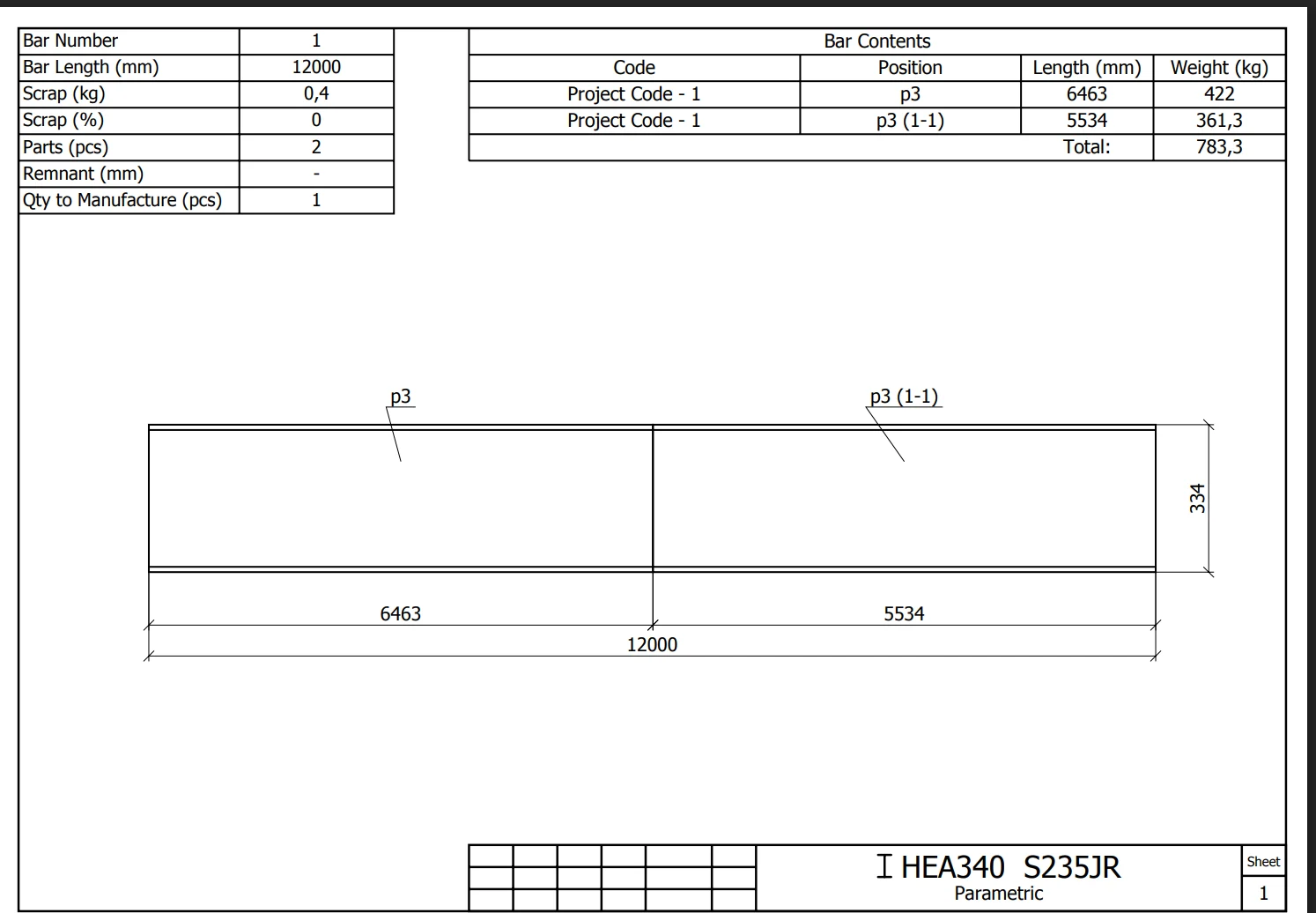
- Cutting drawings and cutting listsPer bar: length, scrap in kg and per cent, parts, remnant and quantity to manufacture, with the contents listed by drawing set and position. Exported to PDF and Excel.
- Drawing settings that matter on the floorMerge identical rows, set minimum part height and remnant length, exaggerate the kerf so it is visible, control view spacing, bevel dimensions and the prefixes used for spliced pieces.
- CNC outputSelecting a CNC machine switches the algorithm to each part's natural length and preserves the original geometry, with the CNC result available for download.
- Export to CAMCutting results export to STEP and IGS for downstream processing in software such as Tubest.
Know your steel, all the way through
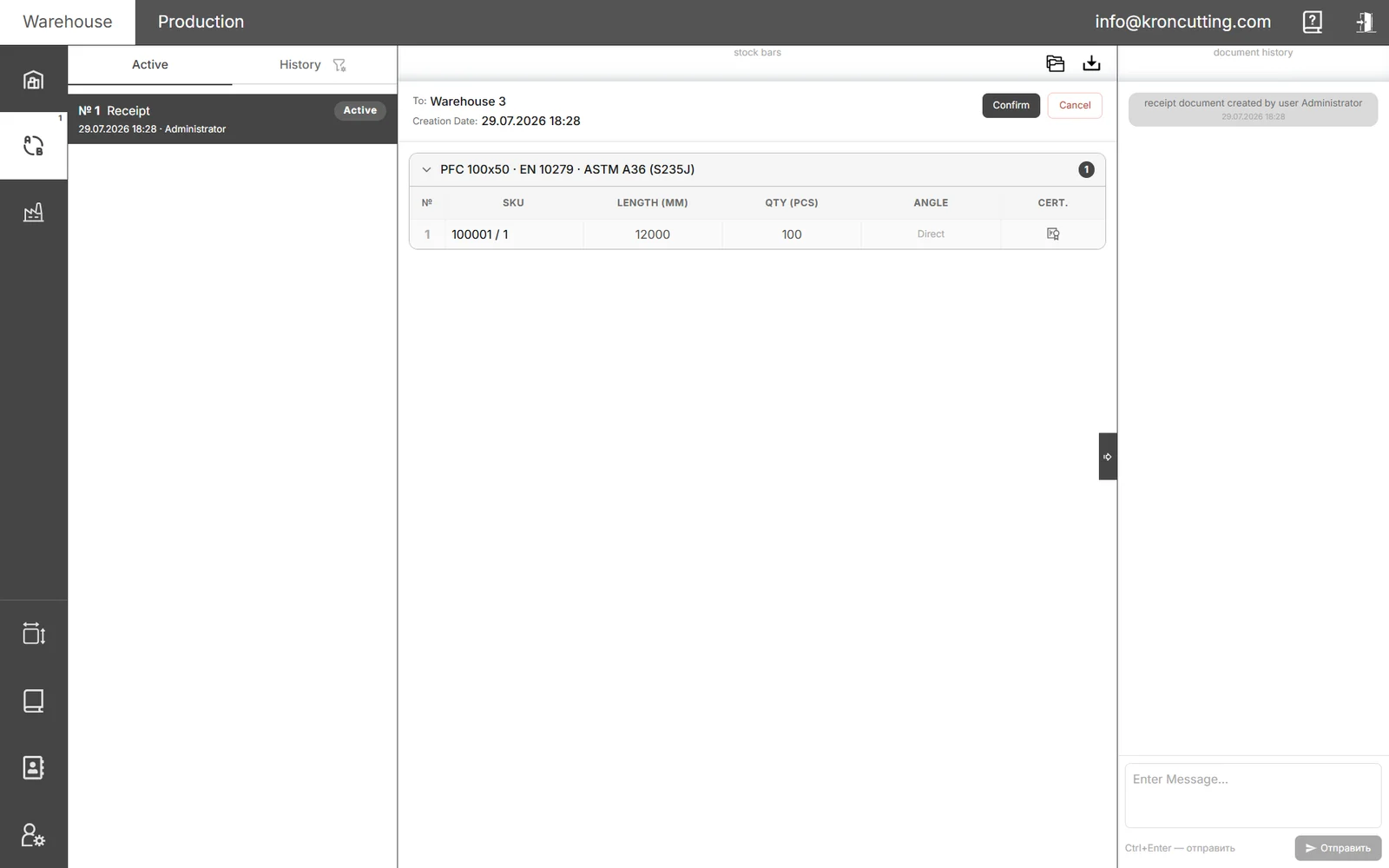
- Warehouse managementBatch accounting against the goods received note (GRN) number, shared item codes for identical geometry and material, reservations, transfers between warehouses and production areas, write-offs and disposal.
- Traceable to the supplierEvery GRN records the supplier it came from. Mill certificates attach to the line and are inherited by every remnant cut from that bar.
- Work ordersReserve the bars a job needs, move them to a production area, then log what has been cut shift by shift — KRON records who entered what, and when.
- Remnant traceabilityA unique mark in 10-10-10 format, stamped at the moment of production, links a remnant to its parent bar and follows it for the rest of its life in the warehouse.
Every run, measured
When a run finishes, KRON reports exactly what it produced. Change a setting, run it again, and compare — the numbers are how you dial in a plan before anything is cut.
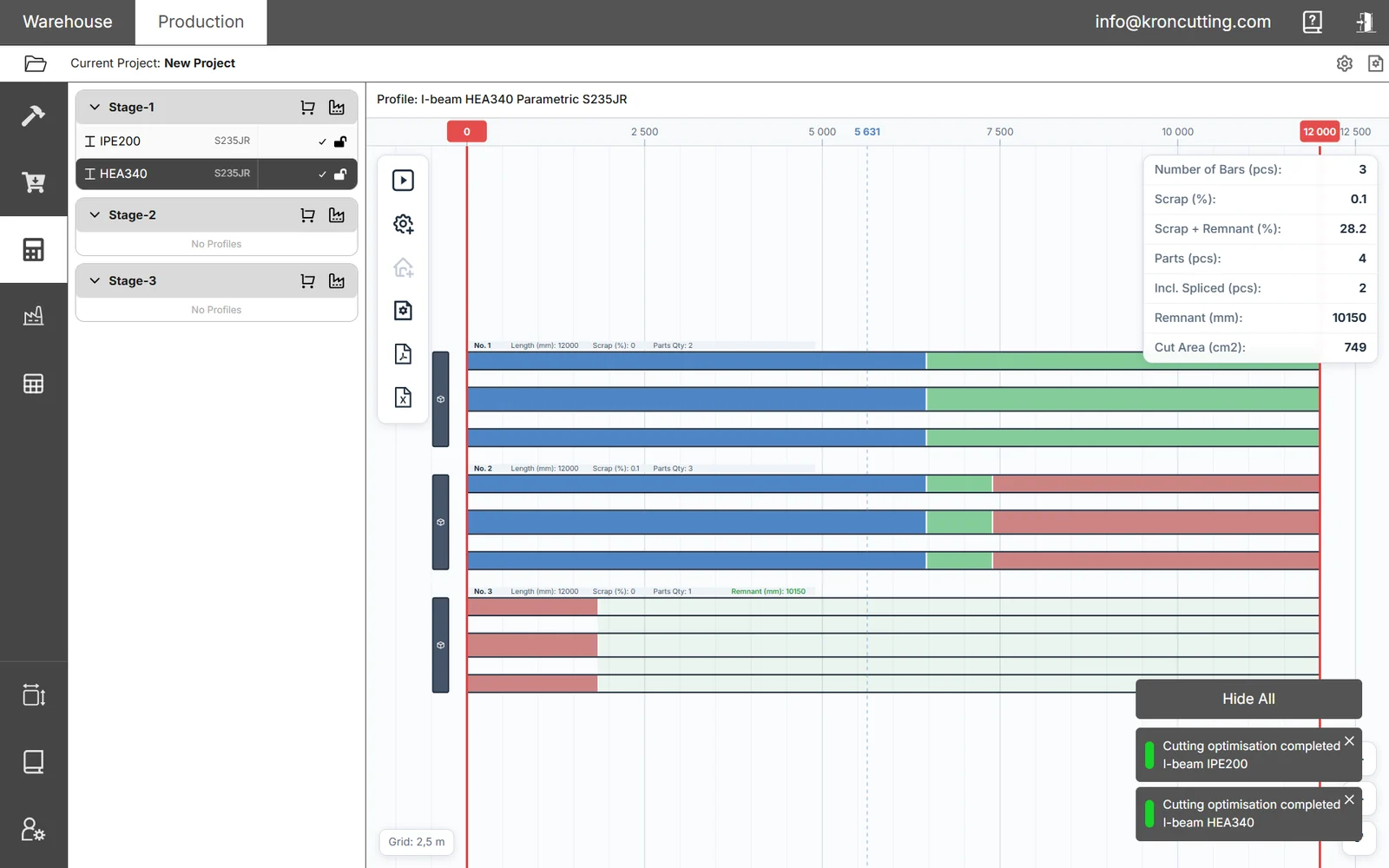
Below is the actual result panel from the job shown on this page: 4 parts of I-beam HEA340 S235JR nested onto 12,000 mm bars. You can check every figure against the cutting plan shown above.
| Number of bars | 3 pcs |
|---|---|
| Scrap | 0.1 % |
| Scrap + remnant | 28.2 % |
| Parts placed | 4 pcs |
| Including spliced | 2 pcs |
| Remnant length | 10,150 mm |
| Cut area | 749 cm² |
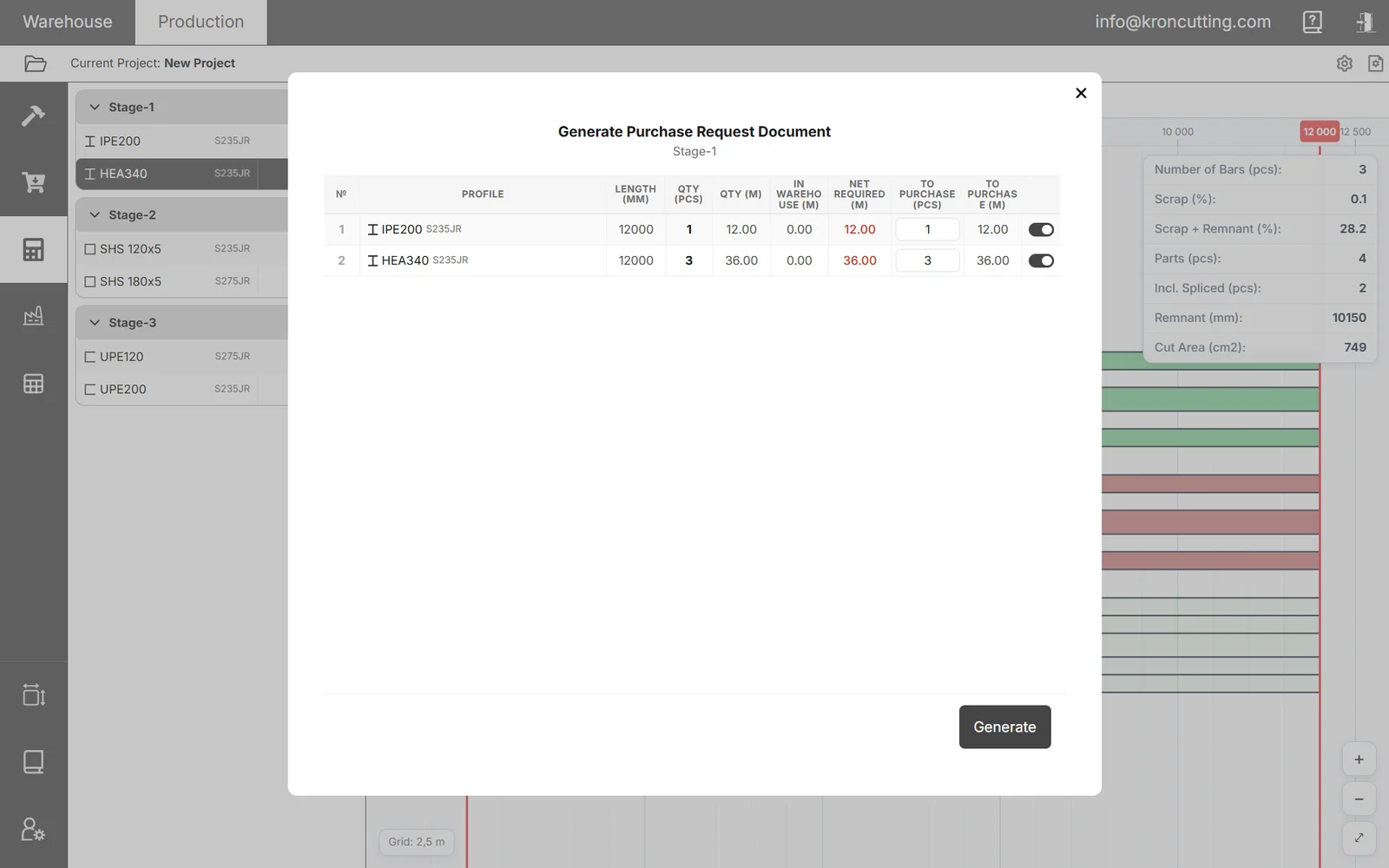
One job is one job — your mix will differ. What it does show is the shape of the output: scrap and reusable remnant reported separately, splices counted, cut area quantified. From the same result you can generate a procurement request and export it to Excel.
Stop throwing away usable steel
When a cut leaves a usable length, KRON records it as a remnant with a unique tag stamped at the moment of production. Registering it through a Remnant Receipt turns it into warehouse stock: it keeps a link to its parent bar, inherits that bar's mill certificates, and is offered back automatically the next time you cut a matching profile.
- 01CutThe plan leaves a length longer than your maximum offcut.
- 02TaggedA unique 10-10-10 tag is stamped at the moment of production.
- 03RegisteredA Remnant Receipt turns it into warehouse stock with its own item code.
- 04ReusedIt is offered back on the next job that matches the profile.
The concrete limits
Before any of the above matters, you need to know KRON physically handles your work. Everything here is a documented limit, not a marketing figure.
Capabilities, not plan contents — several start above the free tier. The comparison matrix says which tier carries what.
Material
- Stock bar length
- 1 – 24 m
- Units
- Millimetres throughout
- Profile types
- I-beam · channel · angle · SHS/RHS · tube — and any type you define yourself
- Standards catalogues
- EN · Indian · South African · custom profiles for anything else
- Materials
- Unlimited, each with an optional supplier alias
- Non-metals
- Any linear material — the optimiser works on lengths, sections and grades
Cutting
- Machines
- Bandsaw · CNC
- Cut types
- Straight · simple angle · complex with a standard angle · complex without one
- Angle entry
- By leg or in degrees, converted automatically using the profile height
- Kerf
- Set per run, added between parts during nesting
- Splicing
- Optional per profile, with a capped number of splices and forbidden zones
- Splice restrictions
- Holes · part connections · cut-outs · ends · centre — by mm or % of length
- Optimisation variants
- Minimum waste · minimum splices · Auto (runs both)
- Iteration step
- Coarse · Normal · Fine
Files
- Import
- DSTV (NC1) · STEP (.stp) · IGS · Excel (stock)
- Export
- PDF · Excel (XLSX) · STEP · IGS · CNC result
- STEP / IGS caveat
- Single parts only, not assemblies. No quantity or material in the file, so both are asked for on import.
- DSTV encodings
- UTF-8 for Tekla 2016+, Advance Steel and most modern software; legacy encodings selectable
Running it
- Delivery
- Runs in the browser — nothing installed on shop machines
- Interface language
- English
- Warehouses & production areas
- Up to 5 on Pro, up to 10 on Factory, unlimited on Enterprise
- Concurrent work
- A run continues while you work elsewhere in the program
- Activity log
- Every operation recorded, filterable by date, action and employee
Where KRON is not the right tool
You will find this out eventually, so you may as well find it out now. If one of these is what you need, KRON is the wrong purchase today.
Not sure which side of the line you are on? Send us a drawing set and we will run it and tell you.
One system for your metal-cutting floor
It runs in your browser — nothing to install on shop machines. Accounts open shortly; tell us about your shop and we will come to you first.