
The number that decides what is scrap and what is stock
Contents — 5 sections
Every bar you cut ends in a piece too short for another part. Whether that piece goes back on the rack or into the skip is not something the saw decides. It follows from a number in the cutting settings, usually typed once during setup and rarely revisited, and it moves more material than anything else on that panel.
The field is Max. Offcut Length (mm). It sets the boundary between scrap and remnant: anything longer than the value is treated as reusable remnant, anything shorter is written off.
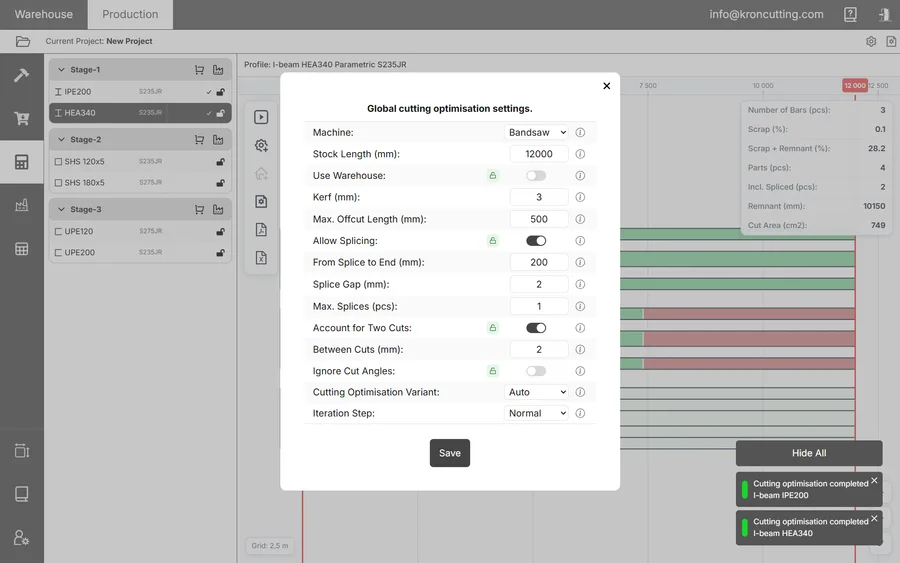
What the threshold changes
The optimiser is not simply minimising leftover material. It works towards minimum offcut and maximum remnant, two goals that pull against each other, and the threshold tells it where the boundary between them lies.
Move that boundary and you change what the algorithm is trying to achieve, along with how the result is labelled afterwards. At a low threshold the optimiser is rewarded for leaving many short tail-ends, since at that setting they all count as remnant. At a high one it will work harder to leave a single long usable piece, accepting more short waste elsewhere to produce it.
This is why the setting repays experiment, and why a number borrowed from another shop is of limited use. The right value describes your rack and your order book: the shortest piece your people will genuinely pick up and cut a part from.
Setting it too low, and setting it too high
Both mistakes are quiet. Neither produces an error, and both move the reported figures in ways that are easy to misread.
Set the threshold too low and you manufacture a rack of short pieces classified as remnant that nobody will ever use. The plan reports an encouraging Scrap figure while the steel is still wasted, occupying rack space and someone's attention instead of the skip. This is the more common of the two mistakes, because a low threshold makes the numbers look better.
Set it too high and usable steel is written off. A 1.2 m length of 200×200 box section is a part waiting to happen in most shops; classify it as scrap and the optimiser stops trying to preserve it, and begins cutting it up to fill other bars.
Tuning it against the results table
A completed run reports two figures that matter here. Scrap (%) is the share of material lost as unusable offcut. Remnant (mm) is the total length of reusable remnant the plan produced. Read them together, because either one on its own can be moved by the threshold without telling you anything useful.
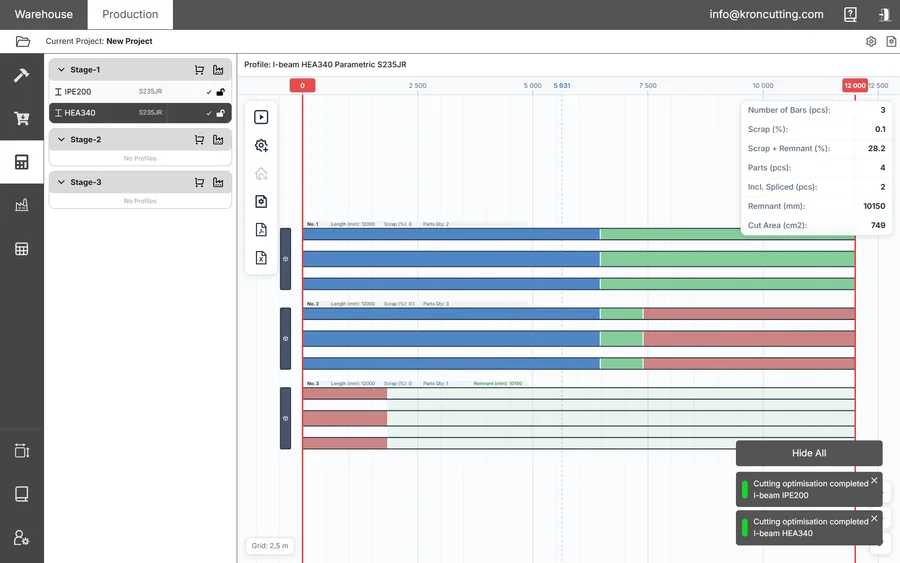
The method takes about twenty minutes:
- Settle everything else first. Machine, stock bar length and kerf describe physical reality and are not really choices; take the kerf from the blade you are actually running, not from a drawing. Decide splicing from your welding practice, and switch on Account for Two Cuts if your saw needs the gap between adjacent cuts of unequal angle.
- Run the plan and note Scrap (%) and Remnant (mm).
- Change Max. Offcut Length by a modest step. Jumping from 200 mm to 2000 mm tells you nothing except that the two extremes differ.
- Run again and compare both figures.
- Continue until Scrap stops improving, or until the remnant lengths being produced are ones you know your shop will not use.
That last condition is a judgement about your yard rather than about the software, which is why the tuning cannot be done for you.
What the parameter does not affect
Two limits catch people out.
The threshold is used only inside the cutting algorithm. It has no bearing on what the Offcut Manager offers you to take into stock at the end of a job. Operators who assume otherwise end up adjusting it to control their warehouse, which it will not do.
Nor does it have to be a single value for everything. Global settings suit most profiles most of the time, but a heavy section may justify a longer minimum remnant simply because a metre of it is worth more, and a light angle may not be worth keeping below three. Select the profile, open the gear button on the left of the cutting window, and set its own value. Profiles carrying their own settings show a gear icon in the list, and the reset button at the top left returns them to the global value.
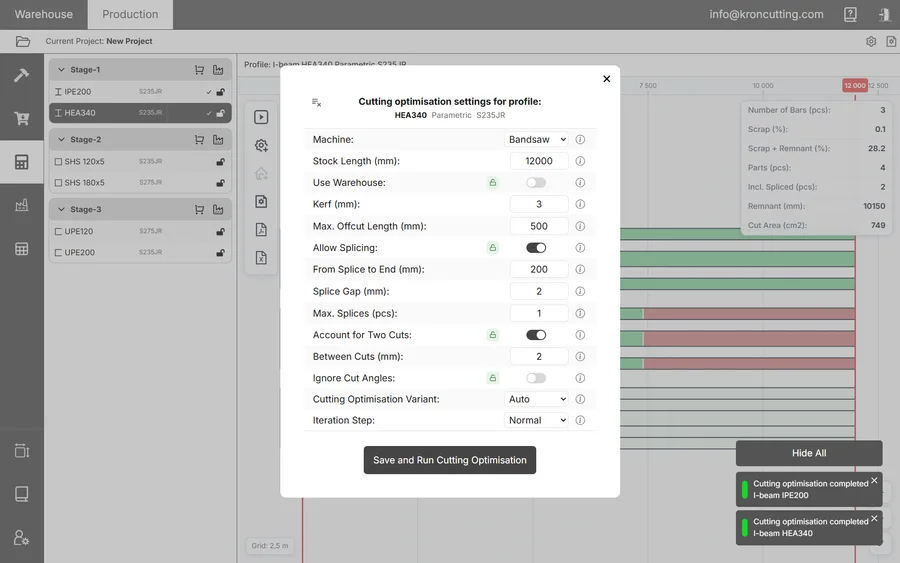
Per-profile overrides are what stop the threshold being a compromise, since one value across a mixed profile list will always be wrong for something.
Where it comes in the settings order
Tuning the threshold while the physical parameters are still moving wastes the effort, so the order matters:
- Machine, Stock Bar Length and Kerf, all of which describe the shop rather than a preference.
- Use Warehouse, according to whether you are planning a purchase or cutting what you hold.
- Allow Splicing and its three parameters, taken from your welding practice.
- Account for Two Cuts, with Between Cuts set from your saw.
- Max. Offcut Length, iterated as above.
- Cutting Optimisation Variant on Auto, to see whether Opt. 2 gives an acceptable result with fewer splices.
- Iteration Step, moved to Fine only at the end.
Iteration Step comes last deliberately. It has a substantial effect on run time and often none at all on the result, so leave it on Coarse or Normal while other values are still changing, and spend the extra minutes once everything else is settled and you want the last fraction of a per cent.