Overview
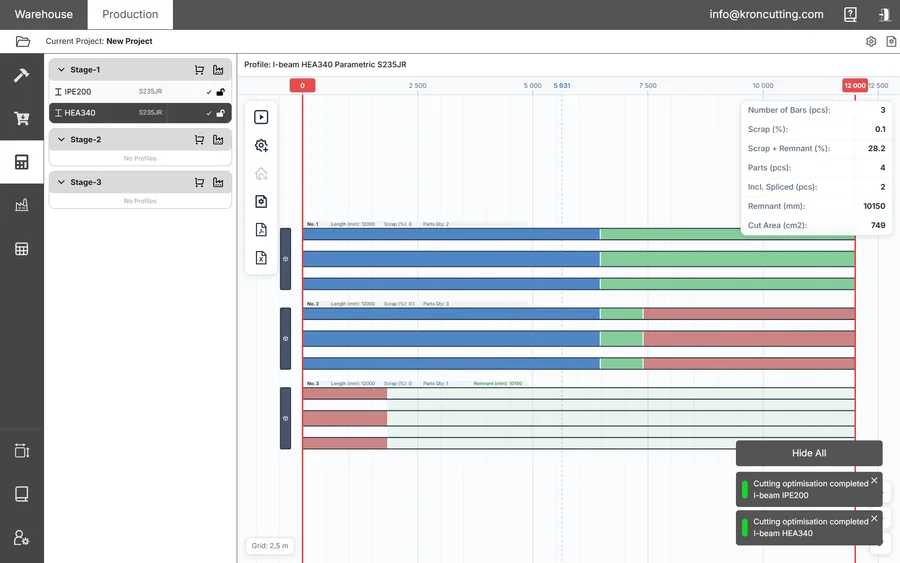
KRON is software for the optimal cutting of metal — and other linear — profiles with minimal waste. It selects a way to cut your stock bars for a given set of parts, and then accompanies the material for the rest of its life: from arriving in the warehouse, through production, to the finished parts and the offcuts that come back.
The point is narrow and practical. Cutting plans drawn up by hand cost money in three places at once — metal in the scrap bin, hours spent on calculation and paperwork, and mistakes that only surface at the saw. KRON is built to remove all three.
What KRON does
- Cutting optimisation — automatically selects a plan that reduces material waste, accounting for cut angles, kerf and your splicing rules.
- Warehouse management — stock accounting, reserving material for a job, controlling transfers, and batch accounting down to the individual bar.
- Document workflow — receipt, transfer, write-off, remnant receipt, disposal, supply request and purchase request documents, generated and numbered for you.
- Production control — tracking cutting stages, fulfilment status, and what is physically on each production area.
Distinctive features
Most of these are the reason a shop chooses KRON over a generic 1D nesting tool:
- cut-angle handling, including complex end cuts
- part splicing, with control over how many splices and where they may fall
- restricting the zones where splicing is forbidden
- working with DSTV (nc1) files from Tekla Structures and other CAD that supports the format
- working with solid-geometry (brep) files — STEP and IGS
- automatic generation of production drawings and process cards
- exporting cutting results to STEP and IGS for further processing in software such as Tubest
- tracking remnants and automatically reusing them in later cutting jobs
Who it is for
| Role | What they get from it |
|---|---|
| Steel structure manufacturers | Precise cutting of beams, tubes, channels and angles, with the real geometry of the cut respected. |
| Manufacturers using any linear profile | The optimiser does not care whether the profile is steel — it works on lengths, sections and materials. |
| Warehouse managers | Stock, batches and transfers under control, with reservations visible before anyone moves anything. |
| Process engineers and foremen | Process cards and cutting drawings generated from the plan, plus visibility of order fulfilment. |
| Procurement specialists | Purchase planning based on what the plan actually needs, less what is already on the rack. |
The two modules
KRON has two operating modes, chosen after login and switchable at any time from the tabs in the top-left of the screen.
Production is where the work is planned: projects, drawing sets, parts, stages, the optimiser itself and the production documents that come out of it.
Warehouse is where the material lives: warehouses and production areas, stock bars, batches, and the documents that move material between them.
You can run Production on its own and get cutting plans, drawings and purchase requests without ever touching the warehouse. What the Warehouse module adds is knowing which specific bars a plan will consume, reserving them, and getting the offcuts back as tracked stock afterwards.
Glossary
The vocabulary below is used consistently throughout the application and the rest of this guide. The full list, including document statuses, is on the glossary page.
| Term | Definition |
|---|---|
| Module | An operating mode: Warehouse or Production. |
| Warehouse | A storage location for rolled metal. Its purpose is storage. |
| Production area | A location for temporarily placing material for production documents. Not for permanent storage. |
| Profile | A metal product with parameters — designation, name, material, standard. |
| Part | A structural element with a defined length, profile, cut angles and restrictions. |
| Stock bar | An element of a given length, to be cut up. |
| Remnant | A leftover after cutting that is long enough to be worth using again. |
| Project | A cutting order that combines several drawing sets. |
| Drawing set | A bound collection of drawings submitted to production. Also called the code. |
| Stage | A part of a project allocated for separate production. |
| Batch | A group of items received on a single document. The batch number is the receipt document number. |
| SKU | The identifier shared by every warehouse item with identical geometry and material. |
| Mark | A unique number stamped on a remnant at the moment of production, in 10-10-10 format. |
Where to go next
If you are setting KRON up for the first time, go to Getting started — it covers the five things to configure before anyone adds a part. If the system is already configured and you want to run a job, start with the Production module.